Converting a MetaLearner to ONNX
Warning
This is a experimental feature which is not subject to deprecation cycles. Use it at your own risk!
ONNX is an open standard for representing trained machine learning models. By converting a Metalearner into an ONNX model, it becomes easier to leverage the model in different environments without needing to worry about compatibility or performance issues.
In particular, this conversion also allows models to be run on a variety of hardware setups. Also, ONNX models are optimized for efficient computation, enabling faster inference compared to the Python interface.
For more information about ONNX, you can check the ONNX website.
In this example we will show how most MetaLearners can be converted to ONNX.
Installation
In order to convert a MetaLearner to ONNX, we first need to install the following packages:
We can do so either via conda and conda-forge:
$ conda install onnx onnxmltools onnxruntime spox -c conda-forge
or via pip and PyPI
$ pip install onnx onnxmltools onnxruntime spox
Usage
Warning
It is important to notice that this method only works for TLearner,
XLearner, RLearner and DRLearner.
Converting an SLearner is highly dependent on the fact that the base
model supports categorical variables or not and it is not implemented yet.
Loading the data
Just like in our example on estimating CATEs with a MetaLearner, we will first load some experiment data:
import pandas as pd
from pathlib import Path
from git_root import git_root

df = pd.read_csv(git_root("data/learning_mindset.zip"))
outcome_column = "achievement_score"
treatment_column = "intervention"
feature_columns = [
    column for column in df.columns if column not in [outcome_column, treatment_column]
]
categorical_feature_columns = [
    "ethnicity",
    "gender",
    "frst_in_family",
    "school_urbanicity",
    "schoolid",
]
# Note that explicitly setting the dtype of these features to category
# allows both lightgbm as well as shap plots to
# 1. Operate on features which are not of type int, bool or float
# 2. Correctly interpret categoricals with int values to be
#    interpreted as categoricals, as compared to ordinals/numericals.
for categorical_feature_column in categorical_feature_columns:
    df[categorical_feature_column] = df[categorical_feature_column].astype("category")
Now that we've loaded the experiment data, we can train a MetaLearner.
Training a MetaLearner
Again, mirroring our example on estimating CATEs with a MetaLearner, we can train an
XLearner as follows:
from metalearners import XLearner
from lightgbm import LGBMRegressor, LGBMClassifier

xlearner = XLearner(
    nuisance_model_factory=LGBMRegressor,
    propensity_model_factory=LGBMClassifier,
    treatment_model_factory=LGBMRegressor,
    is_classification=False,
    n_variants=2,
    nuisance_model_params={"n_estimators": 5, "verbose": -1},
    propensity_model_params={"n_estimators": 5, "verbose": -1},
    treatment_model_params={"n_estimators": 5, "verbose": -1},
    n_folds=2,
)

xlearner.fit(
    X=df[feature_columns],
    y=df[outcome_column],
    w=df[treatment_column],
)
<metalearners.xlearner.XLearner at 0x16a753050>
Note
In this example, we used all lightgbm models because these are the only type of models
that we managed to get to work with categorical encodings from pandas
while also being convertible to ONNX. Other sklearn models which support categoricals such as
HistGradientBoostingRegressor or xgboost models do not have support for them
in their conversion to ONNX. See this issue
and this comment.
Converting the base models to ONNX
Before being able to convert the MetaLearner to ONXX we need to manually convert the necessary
base models for the prediction. To get the necessary base models that need to be
converted we can use _necessary_onnx_models.
necessary_models = xlearner._necessary_onnx_models()
necessary_models
{'propensity_model': [LGBMClassifier(n_estimators=5, verbose=-1)],
 'control_effect_model': [LGBMRegressor(n_estimators=5, verbose=-1)],
 'treatment_effect_model': [LGBMRegressor(n_estimators=5, verbose=-1)]}
We see that we need to convert the "propensity_model", the "control_effect_model"
and the "treatment_effect_model". We can do this with the following code where we
use the convert_lightgbm function from the onnxmltools package.
Note
It is important to know that for classifiers we need to pass the zipmap=False option. This
is required so the output probabilities are a Matrix and not a list of dictionaries.
In the case of using a sklearn model and using the convert_sklearn function, this
option needs to be specified with the options={"zipmap": False} parameter.
import onnx
from onnxmltools import convert_lightgbm
from skl2onnx.common.data_types import FloatTensorType

onnx_models: dict[str, list[onnx.ModelProto]] = {}

for model_kind, models in necessary_models.items():
    onnx_models[model_kind] = []
    for model in models:
        onnx_models[model_kind].append(
            convert_lightgbm(
                model,
                initial_types=[("X", FloatTensorType([None, len(feature_columns)]))],
                zipmap=False,
            )
        )
The maximum opset needed by this model is only 9.
The maximum opset needed by this model is only 8.
The maximum opset needed by this model is only 8.
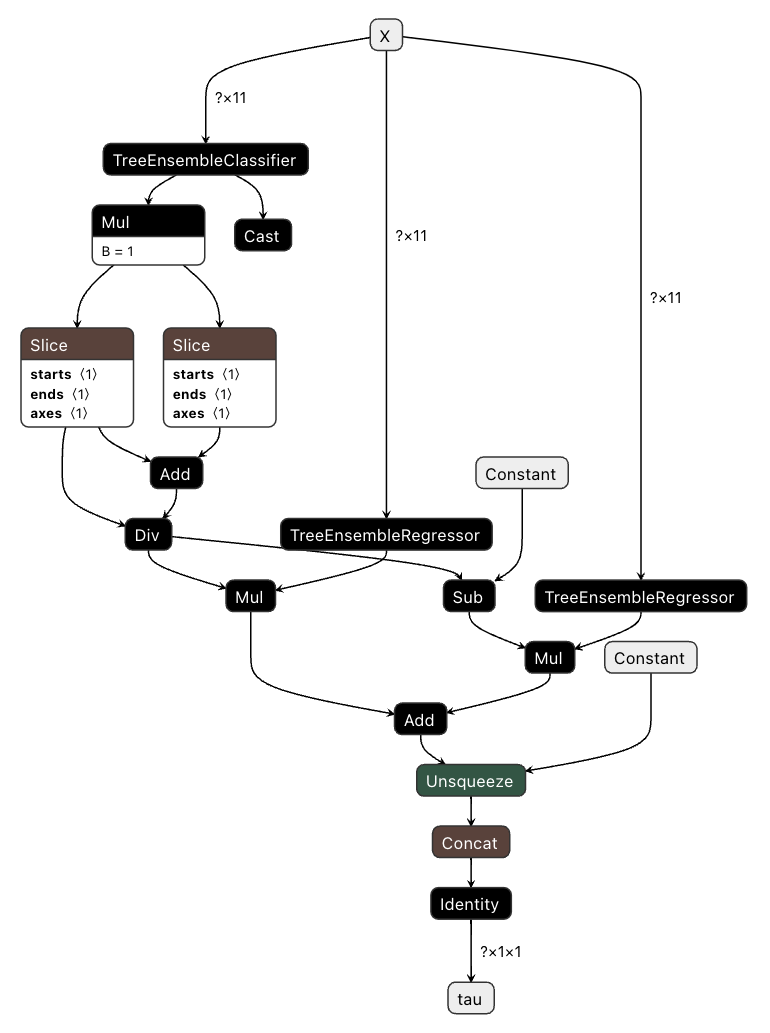
Now we can call _build_onnx which combines
the the converted ONNX base models into a single ONNX model.
This combined model has a single 2D input "X" and a single output named "tau".
The output name can be changed using the output_name parameter.
onnx_model = xlearner._build_onnx(onnx_models)
_build_onnx is an experimental feature. Use it at your own risk!
We can explore the input and output of the model and see that it expects a matrix with 11
columns and returns a three dimensional tensor with shape (..., 1, 1) which is expected
as there is only two treatment variants and one outcome as it is a regression problem.
print("ONNX model input: ", onnx_model.graph.input)
print("ONNX model output: ", onnx_model.graph.output)
ONNX model input:  [name: "X"
type {
  tensor_type {
    elem_type: 1
    shape {
      dim {
      }
      dim {
        dim_value: 11
      }
    }
  }
}
]
ONNX model output:  [name: "tau"
type {
  tensor_type {
    elem_type: 1
    shape {
      dim {
      }
      dim {
        dim_value: 1
      }
      dim {
        dim_value: 1
      }
    }
  }
}
]
We can also visualize the ONNX model with, e.g. netron:
import numpy as np

X_onnx = df[feature_columns].copy(deep=True)
for c in categorical_feature_columns:
    X_onnx[c] = df[c].cat.codes
X_onnx = X_onnx.to_numpy(np.float32)
We can finally use onnxruntime to perform predictions using our model:
import onnxruntime as rt

sess = rt.InferenceSession(
    onnx_model.SerializeToString(), providers=rt.get_available_providers()
)

(pred_onnx,) = sess.run(
    ["tau"],
    {"X": X_onnx},
)
onnx.save_model(onnx_model, "model.onnx")
We recommend always doing a final check with some data that the CATEs predicted by the python implementation and the ONNX model are the same (up to some tolerance). This can be done with the following code:
Note
We have to use the data as if it was out-of-sample with oos_method = True as when we
converted the base models we used the _overall_estimtor.
np.testing.assert_allclose(
    xlearner.predict(df[feature_columns], True, "overall"), pred_onnx, atol=1e-6
)
Further comments
- It would be desirable to work with
DoubleTensorTypeinstead ofFloatTensorTypebut we have noted that some converters have issues with it. We recommend try usingDoubleTensorTypebut switching toFloatTensorTypein case the converter fails. - In the case the final assertion fails we recommend first testing that the different base models have the same base outputs as we discovered some issues with some converters, see this issue and this issue.